


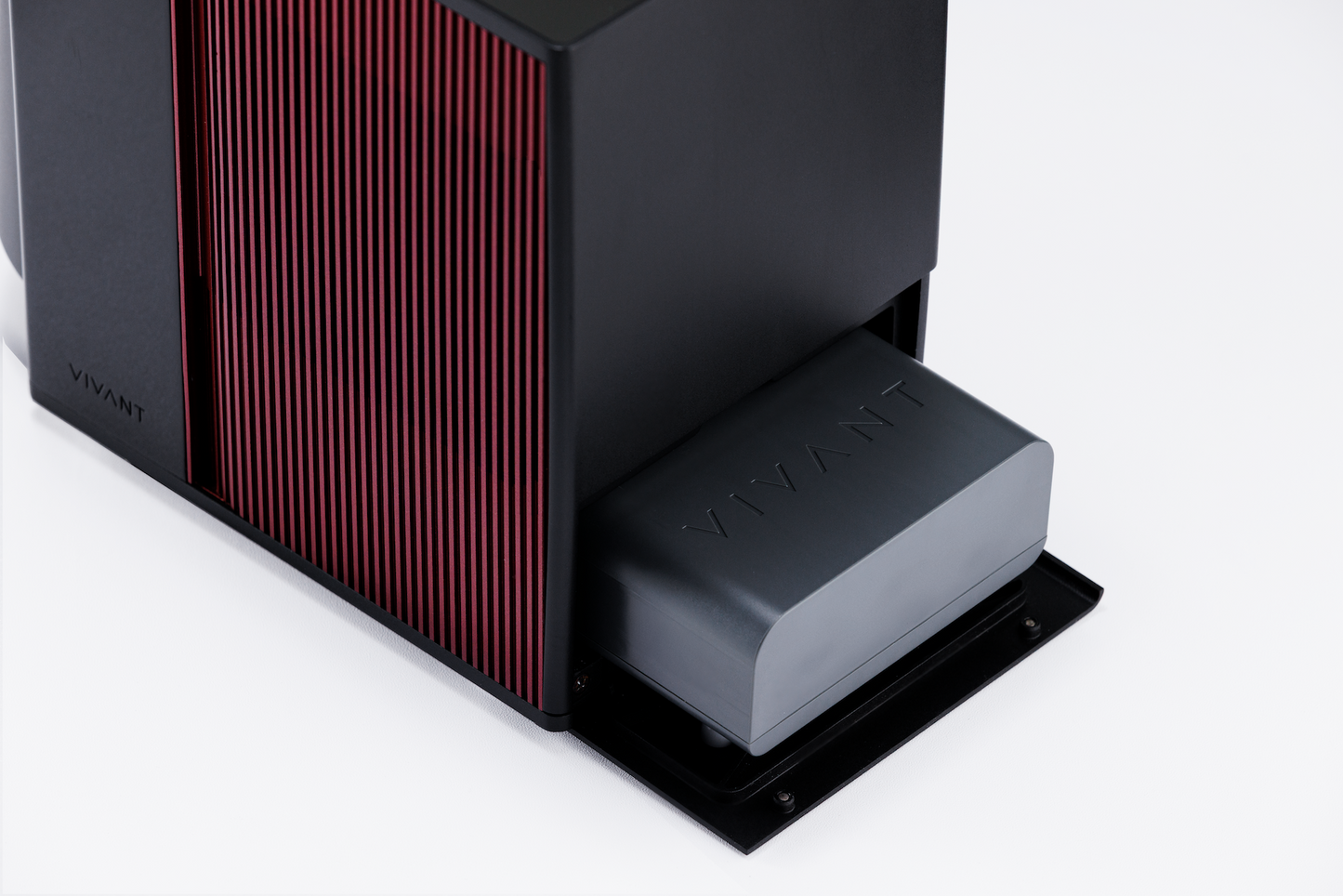
Every degree, exactly right.
Semiconductor cooling, 8°C to 20°C (46°F–68°F). A sophisticated microchip and IR sensor deliver accuracy you can taste — full-spectrum precision for both reds and whites.

Precision, untethered.
A removable, 18V 5,500mAh battery provides up to 4 hours of cord-free performance, with a swappable design for endless runtime and UN38.3 certification for safe travel.

Set it once. Hold it through every pour.
Active semiconductor cooling locks onto your target within ±1°C — terroir preserved, first pour to last.

Customized for the occasion.
Display a personal message — set in seconds from the app. Add your brand logo or a guest's name right on Venus G2's screen. A signature touch for gifting, private events, and luxury hospitality.

Sommelier in your pocket.
Pair with the VIVANT Wine App via Bluetooth. Scan any label for grape, region, vintage, and the recommended serving temperature — or ask the AI sommelier anything — then sync it to Venus G2 with a single tap.

Your personal AI sommelier.
Scan any wine label to instantly reveal grape, region, vintage, and the ideal serving temperature — then ask your AI sommelier anything, from food pairings to tasting notes to similar-wine picks. Expert answers in seconds.
From your phone, set the exact serving temperature — tailored to each bottle.
One tap syncs your target to Venus G2 via Bluetooth. Semiconductor precision holds the temperature steady — first pour to last.


Temperature matters
Simple and effective
Wine speaks at peak
Made for every
table that matters.
table that matters.
Precision wine service — at the dinner table, hosting a private event, or anywhere life takes you. Venus G2 travels with the ritual intact.

Every wine, at its right temperature.

The table's centrepiece. Lit from within.

A terrace. A yacht. A rooftop.
Engineered with the same precision we demand from the wine.
-
Temperature Range8°C – 20°C / 46°F – 68°F
-
BatteryBattery: 2.5–4 hours · 18V · 5,500mAh · 99Wh
-
Power Input/OutputPower Input/Output: 100–240V, 50–60Hz · 21.2V, 2.7A
-
Main Unit Dimensions235(L) × 130(W) × 230(H) mm
-
Main Unit Weight2.69kg / 5.93 lbs (including one rechargeable battery)
-
Bottle ChamberBottle Chamber: 90mm diameter · Fits standard 750ml wine bottles
-
Box Measurements290(L) × 210(W) × 380(H) mm, 4.5kg
-
App ConnectivityBluetooth · VIVANT Wine App (iOS & Android)
Questions
Frequently Asked Questions
-
An electronic wine chiller uses thermoelectric (Peltier) cooling controlled by a sophisticated microchip and IR sensor. VENUS G2 detects your bottle's actual temperature in real time, drives the cooling element precisely to your target, and holds it within ±1°C across an 8°C–20°C range — far more accurate than ice buckets or passive coolers.
-
Up to 2.5–4 hours of continuous cooling, depending on ambient temperature and your target. The rechargeable, removable 18V 5,500mAh cell is UN38.3 certified — swap in a fresh one for uninterrupted service.
-
All of them. 8–20°C covers champagne (8–10°C), whites (10–13°C), rosés (10–12°C), and structured reds (16–18°C). The VIVANT Wine App recommends the exact setpoint for every label.
-
No. VENUS G2 works fully standalone — set the temperature directly on the device. The app adds label scanning, AI sommelier guidance, remote control, and custom display. Optional, not required.
-
Yes. The battery is UN38.3 certified — the international standard for lithium-ion transport — and accepted in carry-on on most major airlines. Check your carrier before you fly.
-
24 months on the main unit against defects in materials and workmanship. Register your product online for a +12-month extended warranty. Accessories (cables, manuals) not covered.
-
A traditional ice bucket cools by submerging the bottle in melting ice — temperatures fluctuate, labels get wet, and there's no way to hold a precise serving temperature. VENUS G2 uses active semiconductor cooling controlled by a sophisticated microchip and IR sensor — locking your bottle to a precise temperature (8°C–20°C) and holding it within ±1°C, ice-free.
-
The best portable wine chillers combine three things: active cooling (not just insulation), cordless operation, and precise temperature control. VENUS G2 delivers all three — semiconductor cooling, a UN38.3-certified rechargeable battery (2.5–4 hours), and IR-sensor precision across 8°C–20°C.
-
Most red wines are best between 12–18°C (54–64°F). Bigger reds like Cabernet Sauvignon and Syrah at 16–18°C; lighter reds like Pinot Noir at 12–14°C. Whites are best at 8–12°C (46–54°F) — crisp Sauvignon Blanc and Riesling cooler, oaked Chardonnay slightly warmer. VENUS G2's full range covers 8°C–20°C, with the VIVANT Wine App suggesting the exact setpoint for every label.
YOUR Venus G2
In the Box + User Guide
Get started with your VENUS G2 using our step-by-step guide for optimal performance.
-
- 01 VENUS G2 Main Unit × 1
- 02 Charging Unit & Cable × 1
- 03 Rechargeable Lithium-ion Battery × 1
- 04 Charging Dock × 1
- 05 International Warranty Card × 1
- 06 User Guide QR code × 1
-

Dock Charging
Plug the power adapter into the charging dock, then place the rechargeable, removable lithium-ion battery onto the dock. The indicator light switches from red to green once charging is complete.

In-Unit Charging
Insert the battery into the main unit, then connect the power adapter. The device must stay powered off during charging — the display will show the real-time charging percentage.
-
-
01
Scan & get a recommendation
Open the VIVANT Wine App, then scan the label or ask the AI Sommelier for the recommended serving temperature.
-
02
Insert the bottle
Take the wine from your cellar or refrigerator and place it in the Venus G2 chamber.
-
03
Power on
Press and hold the control knob for 2 seconds to start Venus G2.
-
04
Connect via Bluetooth
In the app, connect to Venus G2 via Bluetooth.
-
05
Send to device
Tap “Send to Device” to sync the recommended temperature in one tap.
-
06
Let Venus G2 take over
Venus G2 holds a steady temperature throughout; a gentle chime sounds when the timer completes. (Tip: adjust the in-chamber light bar from the app so the label stays easy to read.)
-
01
Prepare the Wine
Take the wine from your cellar or refrigerator and place it in the Venus G2 chamber, resting against the cooling plate at the back.
-
02
Power on
Press and hold the control knob for 2 seconds. The welcome screen appears, then the home screen.
-
03
Set the temperature
Short press; the temperature flashes. Rotate clockwise to raise, counterclockwise to lower. Range 8–20°C (46–68°F).
-
04
Set the decanting time (if needed)
Short press again; the timer flashes. Rotate to set the duration in 10-minute steps, up to 8 hours.
-
05
Other settings (optional)
Short press to cycle light bar brightness, audio, and °C/°F; rotate to adjust.
-
06
Confirm & Start
After about 5 seconds the screen returns home and Venus G2 holds your set temperature; a gentle chime sounds when the timer completes.
-
07
Power off
Hold the knob for 2 seconds until the logo appears; wait until the device fully stops before removing the battery or unplugging.
-
01
-
-
 Press 2 seconds
Power On & Off
Press and hold the control knob for 2 seconds to turn Venus G2 on or off. The logo appears on both startup and shutdown.
After turning off and the screen goes dark, please wait a moment until the device has completely stopped before removing the battery or unplugging the power cable. -
 Bluetooth
(connected) Live IR-detected
temperature
-------------
Set target
temperature Elapsed Time
-------------
Set Decanting TimeHome Screen
Top status bar (left to right): Battery level, Bluetooth (shown when the device is connected to the VIVANT Wine App) and Other Settings (the gear icon).
* Left area — Top: Live temperature from the IR sensor; Bottom: Set target temperature.
* Right area — Top: Elapsed Time. It counts up from power-on; once a decanting time is set, it shows how long the wine has been decanting. Bottom: your set decanting time. -
 Light Bar Brightness
(High / Low / Off) Chime
(On / Off) Temperature Unit
(°C / °F)Other Settings
From the home screen, a third short press opens the Other Settings screen.
From left to right:
* The brightness of in-chamber LED light bars (High / Low / Off)
* Chime (On / Off)
* Temperature Unit (°C / °F) -
 Target Temperature Reached
Status Labels
The label next to the set temperature shows the current status:
* ▼ — temperature control is active.
* hold — the target is reached; the left ring turns from white to blue.
* set — shown while you change a setting.
When the decanting time is up, a chime sounds and the timer keeps counting up. -
 First 5 Minutes,
the reading settling Below 0 °C Above 30 °CSpecial States
Three prompts can appear at the top of the screen. None of them stops cooling or the timer, and they are not error codes.
Stabilizing.. — the first 5 minutes after power-on, while the reading settles.
Too Cold.. — the reading is below 0 °C (< 00 °c).
Too Warm.. — the reading is above 30 °C (> 30 °c). -

Error Messages
ERROR 1: Battery abnormal.
ERROR 2: IR Temperature Sensor abnormal.
ERROR 3: Fan abnormal.
If an error appears, turn Venus G2 off and on again. If it still appears, scan the QR code for troubleshooting steps or to contact support.
-
-
First Use & Long-Term Storage — Before first use or after a long period of inactivity, insert the battery into the unit (powered off) or place it on the charging dock. Charge for 3–4 hours until fully charged.Battery Care — Recharge after every use to extend battery life.Heat Dissipation — Leave sufficient space around the device during operation.Bottle Placement —For optimal cooling performance, ensure the bottle sits fully and securely in the chamber.Approved Accessories Only — The rechargeable, removable lithium-ion battery is custom-designed for VIVANT. Use only approved chargers and do not attempt to disassemble the battery.Auto Power-Off — For safety, VENUS G2 automatically shuts down 8 hours after the last operation.Avoid High Heat — Do not place the device in high-temperature environments such as dishwashers, microwaves, or ovens.Adult Supervision — Intended for individuals with sufficient knowledge and experience, or under appropriate supervision. Keep out of reach of children to prevent unintended operation.


-
24-Month Warranty
-
14-Day Quality Guarantee
-
Worldwide Shipping